
Categories
- All Categories
- 1.4K Cubism Editor
- 1.2K Help
- 54 Tips and Tricks
- 200 Feature requests
- 51 Other Live2D Products and Tools
- 1 Cubism Viewer (for OW, for Unity)
- 3 Material Separation Photoshop Plug-in
- 47 Other Live2D Products and Tools (Other Photoshop Scripts, Sample Data, etc.)
- 302 Cubism SDK
- 266 Help
- 11 Tips and Tricks
- 25 Feature Requests
- 182 Community
- 40 General Discussions
- 10 Feature Requests
- 26 Projects, Showcase & Critiques
Using the new polygon margin settings

Hi,
my name is Masaya and I'm a designer working at Live2D. Today I wan't to introduce a few new psd import features introduced with the Cubism Editor 2.1.06. Several issues with psd importing are fixed in this version, too, so please give it a try. The new version allows you to set "inner" and "outer" polygon margins in the psd import dialog. They allow more precise and better automatic generation of polygons from psd layers. (Please excuse that the screenshots show the Japanese editor).
Boundary margin (Outside)
This value controls the outer offset of the polygons to the outer edge of opaque image elements.

Boundary margin (Inner)
This value controls the inner offset of the polygons to the outer edge of opaque image elements.

Default settings
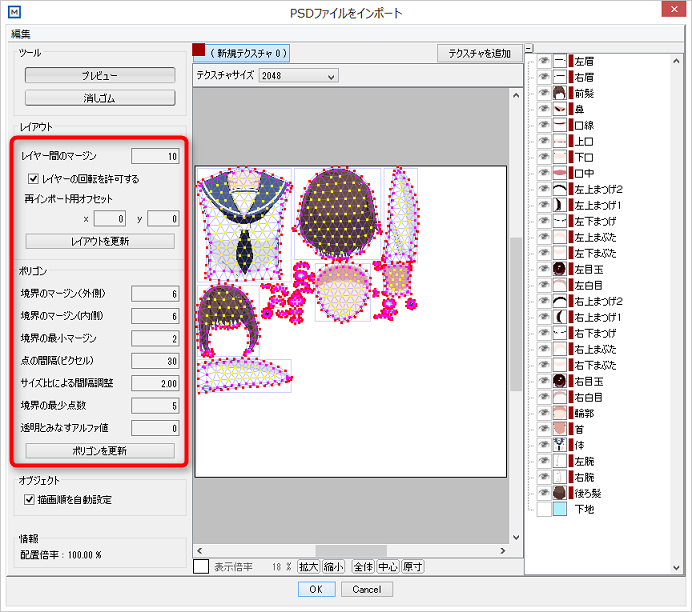
When you import a psd for the first time, all layout and polygon settings will have their default value. Although these are recommended values, adjust them to your needs. You can always reset the values to their defaults from "Edit" -> "Reset polygon settings".
my name is Masaya and I'm a designer working at Live2D. Today I wan't to introduce a few new psd import features introduced with the Cubism Editor 2.1.06. Several issues with psd importing are fixed in this version, too, so please give it a try. The new version allows you to set "inner" and "outer" polygon margins in the psd import dialog. They allow more precise and better automatic generation of polygons from psd layers. (Please excuse that the screenshots show the Japanese editor).
Boundary margin (Outside)
This value controls the outer offset of the polygons to the outer edge of opaque image elements.
Boundary margin (Inner)
This value controls the inner offset of the polygons to the outer edge of opaque image elements.
Default settings
When you import a psd for the first time, all layout and polygon settings will have their default value. Although these are recommended values, adjust them to your needs. You can always reset the values to their defaults from "Edit" -> "Reset polygon settings".
Comments
thanks for the update! i'll have to download and see what's new!
the new margins would help me with forming the lips, i always find myself going back to the texture have more control of the shape, this should be very helpful!
Thank you for taking part in this forum and introducing us the new feature. It's always a pleasure to know that someone from dev. team get involved in the forum discussion.
Your english is quite good. The more you practice the better you get
As for myself, I am trying to learn Japanese. It's fun to learn, but I still have a long way to go.