
Categories
- All Categories
- 1.4K Cubism Editor
- 1.2K Help
- 54 Tips and Tricks
- 200 Feature requests
- 53 Other Live2D Products and Tools
- 1 Cubism Viewer (for OW, for Unity)
- 3 Material Separation Photoshop Plug-in
- 49 Other Live2D Products and Tools (Other Photoshop Scripts, Sample Data, etc.)
- 302 Cubism SDK
- 266 Help
- 11 Tips and Tricks
- 25 Feature Requests
- 182 Community
- 40 General Discussions
- 10 Feature Requests
- 26 Projects, Showcase & Critiques
Fail to export model to moc3 file

Hello everyone, I am new to live2d and just want to export my model for runtime. However, I encountered a problem during the process.
After I clicked the “export” button, it pops up a small "exporting" window, however the progress bar is 0% no matter how long I wait, and the whole application freeze out that I need to terminate the application using task manager. My file is quite large such that it is 1gb, so I tried to reduce texture atlas size, delete unused parts and reduce extended interpolation but still cannot succeed. After I restart the application, the log doesn’t show any error message and my model file does not contain any repeat parameters.
May I ask is there any solution for my problem? Also, during rigging, I copied and reflected some symmetrical parts to another side for convenience. For example, I finished rigging the left eye of the model, then I will just copy the left eye and its child object and reflect to become a finished right eye. However, the texture atlas only shows the left eye but not also the copied right eye, may I ask is it related to the failure of exporting?
Attached is the freezing out screenshot, happy to provide more information if needed. hope to hearing back soon as I do not want to start over:(
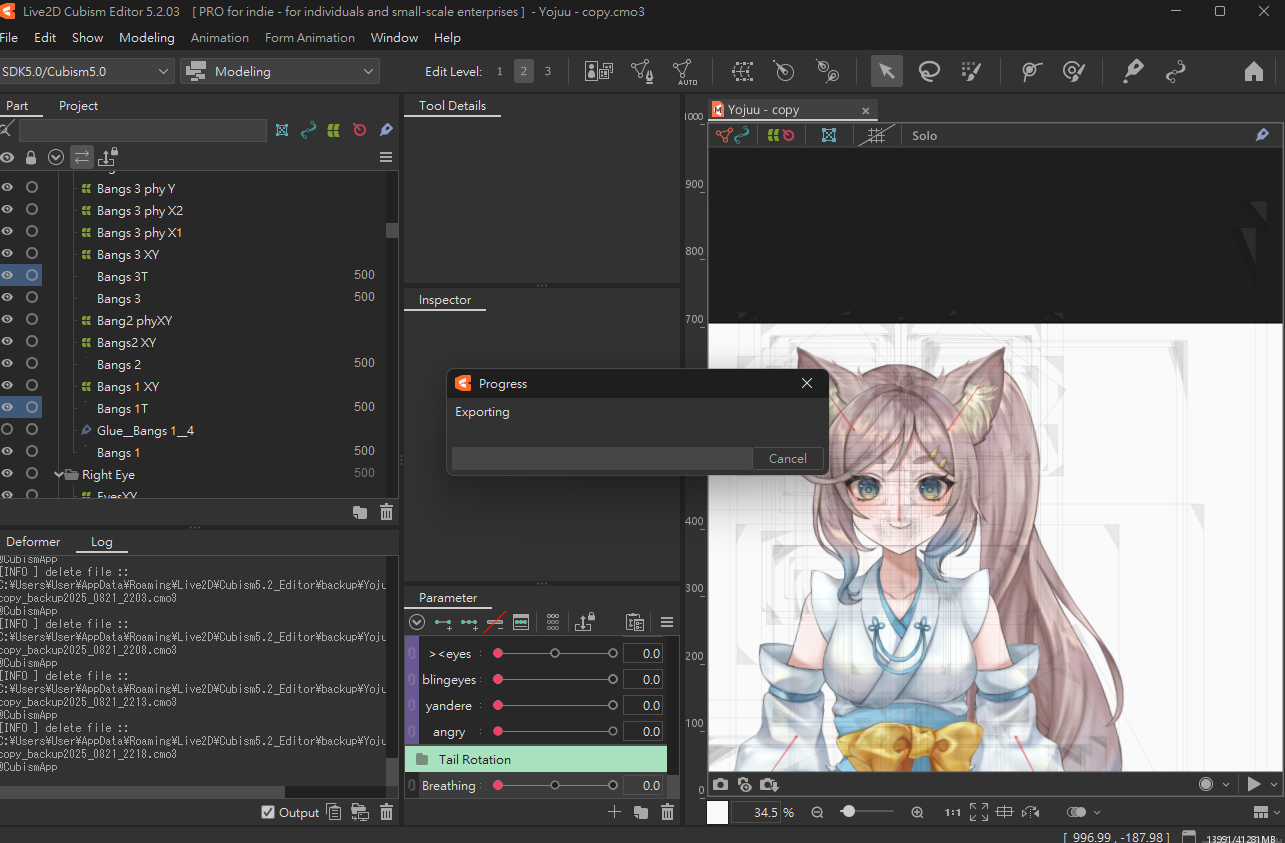
After I clicked the “export” button, it pops up a small "exporting" window, however the progress bar is 0% no matter how long I wait, and the whole application freeze out that I need to terminate the application using task manager. My file is quite large such that it is 1gb, so I tried to reduce texture atlas size, delete unused parts and reduce extended interpolation but still cannot succeed. After I restart the application, the log doesn’t show any error message and my model file does not contain any repeat parameters.
May I ask is there any solution for my problem? Also, during rigging, I copied and reflected some symmetrical parts to another side for convenience. For example, I finished rigging the left eye of the model, then I will just copy the left eye and its child object and reflect to become a finished right eye. However, the texture atlas only shows the left eye but not also the copied right eye, may I ask is it related to the failure of exporting?
Attached is the freezing out screenshot, happy to provide more information if needed. hope to hearing back soon as I do not want to start over:(
Answers
Thanks for using our product.
First, please tell us about your PC environment.
- OS & Version: (e.g. Windows 10, macOS HighSierra)
- PC Model: (e.g. MacBookPro 2017)
- Graphics Specifications: (e.g. GeForce GTX 950M)
- CPU: (e.g. Intel Core i7-7700)
- Memory: (e.g. 8GB)
- Illustration Software used: (e.g. Photoshop, ClipStudio, SAI)
- Attach screenshot or capture video to show your problem
Next, please store the model and log files that are causing the problem in the following data box.
https://biz.datadeliver.net/posts/7ILzCyYfEYPI
Note that this databox will only be made available to our development team.
For information on how to retrieve the logs, please check here.
https://help.live2d.com/en/other/other_22/
Best regards.
Hi ookubo, the problem is solved as I deleted some unused layers and psd files on project section, I wondered those excessive layers are the main reason to make the application crash during exporting. Thank you for reaching me out anyway