
Categories
- All Categories
- 1.4K Cubism Editor
- 1.2K Help
- 54 Tips and Tricks
- 200 Feature requests
- 51 Other Live2D Products and Tools
- 1 Cubism Viewer (for OW, for Unity)
- 3 Material Separation Photoshop Plug-in
- 47 Other Live2D Products and Tools (Other Photoshop Scripts, Sample Data, etc.)
- 302 Cubism SDK
- 266 Help
- 11 Tips and Tricks
- 25 Feature Requests
- 182 Community
- 40 General Discussions
- 10 Feature Requests
- 26 Projects, Showcase & Critiques
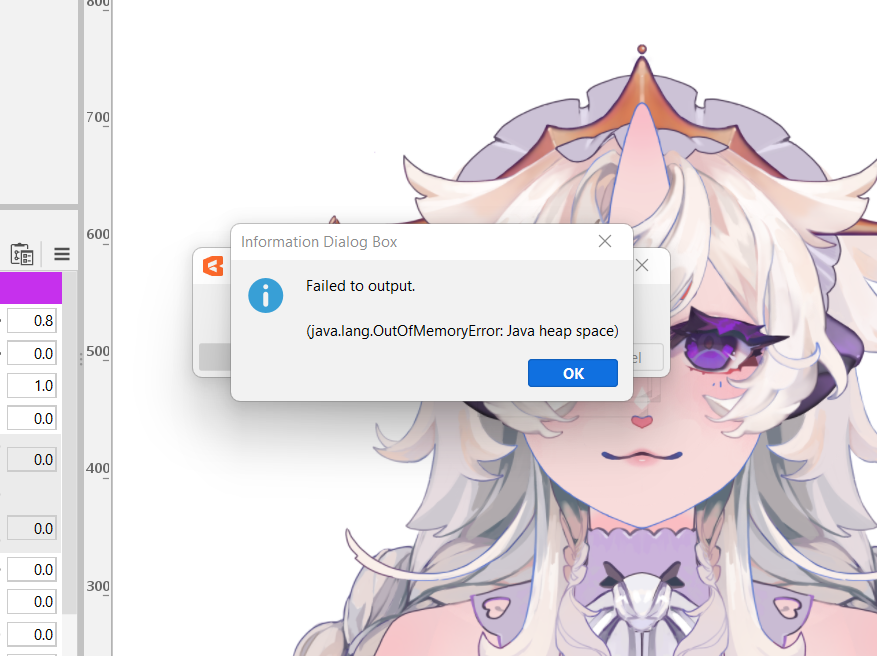
java.lang.OutOfMemoryError: Java heap space [ISSUE]

I'm trying to save my model and am getting this error message "java.lang.OutOfMemoryError: Java heap space". It seems like I need to increase my java memory, but can't seem to find out how, and the manual page that used to show it seems to have been deleted. If anyone knows how to solve this problem, I'd greatly appreciate any help!
(Also, I tried searching my Environment Variable for "_JAVA_OPTIONS", but there is no such variable present).
- Live2D Software Version: Cubism Editor 5.0.03
- OS & Version: Windows 11
- PC Model: Micro-Star MS-7D09
- Graphics Specifications: GeForce RTX 3070
- CPU: Intel(R) Core(TM) i7-11700K
- Memory: 32GB
- Illustration Software used: ClipStudio
- Attach a screenshot or capture video to show your problem:
-
(Also, I tried searching my Environment Variable for "_JAVA_OPTIONS", but there is no such variable present).
- Live2D Software Version: Cubism Editor 5.0.03
- OS & Version: Windows 11
- PC Model: Micro-Star MS-7D09
- Graphics Specifications: GeForce RTX 3070
- CPU: Intel(R) Core(TM) i7-11700K
- Memory: 32GB
- Illustration Software used: ClipStudio
- Attach a screenshot or capture video to show your problem:
-
Comments
The file is in Program Files->Live2D Cubism 5.0 directory. Don't open by double click. You need to open it by Text Editor.
```
rem ** Memory Size
rem set MAX_MEMORY=4000 // <- You can edit this number, 8000, 16000, and so on.
rem set MAXMEMORY=-Xmx%MAX_MEMORY%m
set MAXMEMORY=-XX:MaxRAMPercentage=100
```
I hope this leads to a resolution.
Thank you for your continued patronage of our products.
We are Live2D staff.
Regarding the change in memory usage in the Cubism Editor, the current version has been changed to a usage that does not require any operation.
Although no operation is normally required, you can find instructions on how to deal with this in the link below, which we hope you will read if you are interested.
▼About Memory Usage
https://docs.live2d.com/4.2/en/cubism-editor-manual/memory-usage/
Also, to lighten the operation, if you have been re-importing PSDs, try deleting unused originals.
▼Delete unused layers
https://docs.live2d.com/en/cubism-editor-manual/original-picture/#:~:text=Delete unused layers
If other software is running, close it down.
Best regards.
@obsidian
Thanks for the great advice!