
Categories
- All Categories
- 1.4K Cubism Editor
- 1.2K Help
- 54 Tips and Tricks
- 200 Feature requests
- 51 Other Live2D Products and Tools
- 1 Cubism Viewer (for OW, for Unity)
- 3 Material Separation Photoshop Plug-in
- 47 Other Live2D Products and Tools (Other Photoshop Scripts, Sample Data, etc.)
- 302 Cubism SDK
- 266 Help
- 11 Tips and Tricks
- 25 Feature Requests
- 182 Community
- 40 General Discussions
- 10 Feature Requests
- 26 Projects, Showcase & Critiques
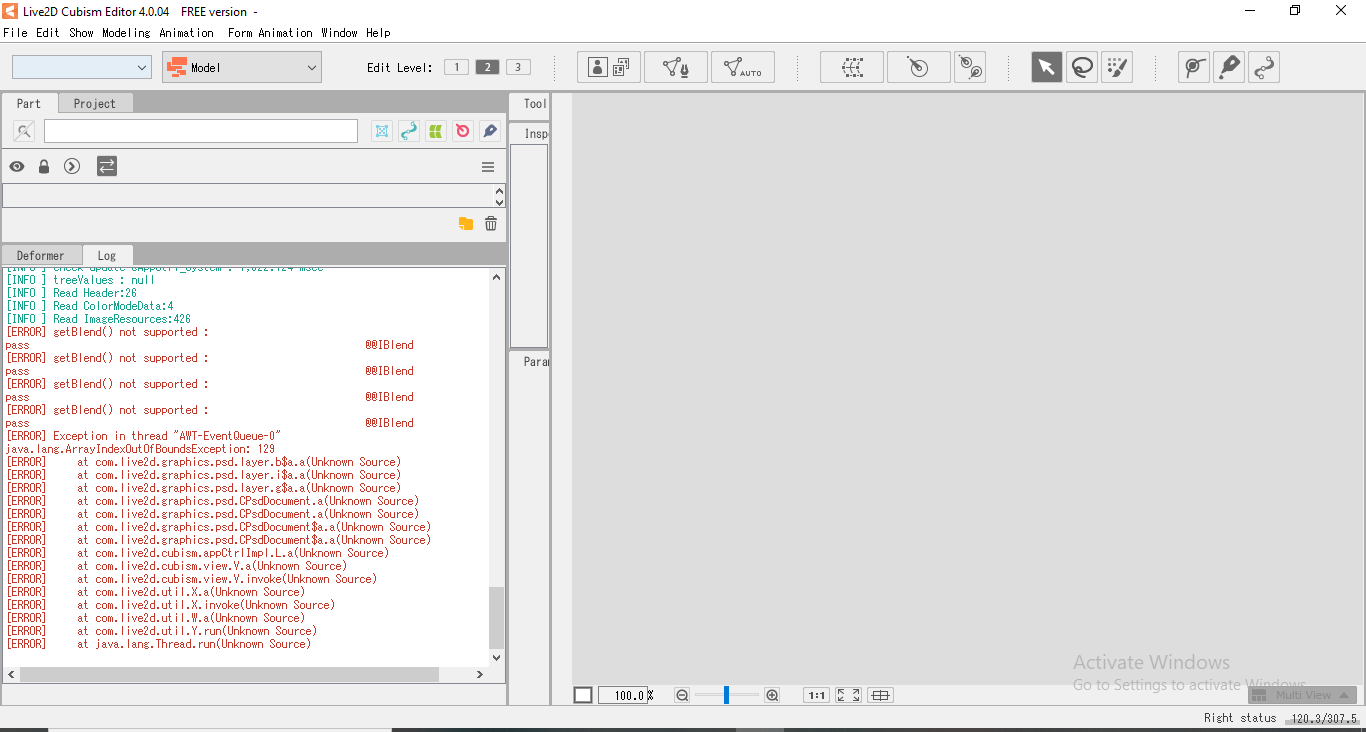
When I drag in a file/open up a file.The file doesn't open. It works before but now it doesn't.

Best Answer
-
Hello @Aoryx
There may be a special layer in the PSD.
Please check the manual here.
https://docs.live2d.com/cubism-editor-manual/divide-the-material/?locale=en_us
https://docs.live2d.com/cubism-editor-manual/precautions-for-psd-data/?locale=en_us
Bset regards.

Answers