
Categories
- All Categories
- 1.4K Cubism Editor
- 1.2K Help
- 54 Tips and Tricks
- 200 Feature requests
- 51 Other Live2D Products and Tools
- 1 Cubism Viewer (for OW, for Unity)
- 3 Material Separation Photoshop Plug-in
- 47 Other Live2D Products and Tools (Other Photoshop Scripts, Sample Data, etc.)
- 302 Cubism SDK
- 266 Help
- 11 Tips and Tricks
- 25 Feature Requests
- 182 Community
- 40 General Discussions
- 10 Feature Requests
- 26 Projects, Showcase & Critiques
If you have any questions, reports, suggestions, or requests about Live2D, please send them to this forum.
※We cannot guarantee statements or answers from Live2D staff. Thank you for your understanding in advance.
<b class="Bold"><big>Live2D Cubism</big></b>
<a href="https://www.live2d.com/en/"><alt="Cubism Products and Downloads">Cubism Products and Downloads</a>
<b class="Bold"><big>Cubism product manuals and tutorials</big></b>
<a href="https://docs.live2d.com/cubism-editor-manual/top/?locale=en_us"><alt="Cubism Editor Manual">Cubism Editor Manual</a> <a href="https://docs.live2d.com/cubism-editor-tutorials/top/?locale=en_us"><alt="Cubism Editor Tutorial">Cubism Editor Tutorial</a> <a href="https://docs.live2d.com/cubism-sdk-manual/top/?locale=en_us"><alt="Cubism SDK Manual">Cubism SDK Manual</a> <a href="https://docs.live2d.com/cubism-sdk-tutorials/top/?locale=en_us"><alt="Cubism SDK Tutorial">Cubism SDK Tutorial</a>
※We cannot guarantee statements or answers from Live2D staff. Thank you for your understanding in advance.
<b class="Bold"><big>Live2D Cubism</big></b>
<a href="https://www.live2d.com/en/"><alt="Cubism Products and Downloads">Cubism Products and Downloads</a>
<b class="Bold"><big>Cubism product manuals and tutorials</big></b>
<a href="https://docs.live2d.com/cubism-editor-manual/top/?locale=en_us"><alt="Cubism Editor Manual">Cubism Editor Manual</a> <a href="https://docs.live2d.com/cubism-editor-tutorials/top/?locale=en_us"><alt="Cubism Editor Tutorial">Cubism Editor Tutorial</a> <a href="https://docs.live2d.com/cubism-sdk-manual/top/?locale=en_us"><alt="Cubism SDK Manual">Cubism SDK Manual</a> <a href="https://docs.live2d.com/cubism-sdk-tutorials/top/?locale=en_us"><alt="Cubism SDK Tutorial">Cubism SDK Tutorial</a>
[Regarding macOS Tahoe](Updated October 16, 2025)
macOS v26 Tahoe is now supported!
We advise against upgrading your macOS at this time as it may cause Live2D products not to function correctly.
Upgrading macOS can also cause you to lose your Cubism Editor license file.
Please make sure to deactivate your Cubism Editor license before upgrading the macOS.
For more details:
https://help.live2d.com/en/other/other_09/
For inquiries regarding issues with license purchases or license activation errors, please contact us through the <a href="https://www.live2d.jp/eng/contact/?redirect=1">email form.</a>
[BUG] Parameter popup window display issue in Live2D Cubism Editor (4K + dual monitor setup)

I've been experiencing a persistent display bug with the Parameter window in Live2D Cubism Editor and wanted to report it here in the hope that it can be looked into and fixed in a future update.
Affected versions:
Live2D Cubism Editor 5.1 – 5.4 (I’m not sure if earlier versions also had this issue, but it has been present ever since I started using the software.)
Description:
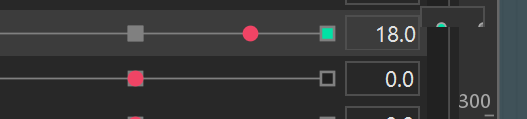
After using the Editor for a while, the parameter popup window (the small window that appears to the right of a parameter when you select it) starts displaying incompletely. Once this happens, the parts that are cut off become completely unclickable and unusable.
This is not project-specific — it happens with every project and every version I’ve used. Restarting the Editor temporarily fixes it, but the problem always comes back after some time, which is quite disruptive to my workflow.
1. Parameter popup is cut off / truncated:
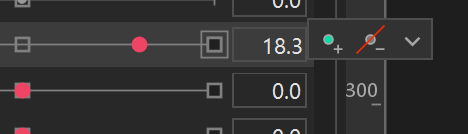
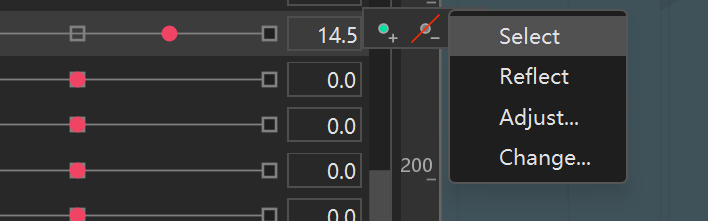
2. Normal appearance of the parameter popup (for comparison):
Possible cause:
I first noticed this issue after switching to a dual-monitor setup (4K + 2K). It has persisted even after changing my PC hardware and installing multiple Windows updates.
I’d really appreciate it if the official team could look into this and hopefully address it in a future update.
Thank you!
Affected versions:
Live2D Cubism Editor 5.1 – 5.4 (I’m not sure if earlier versions also had this issue, but it has been present ever since I started using the software.)
Description:
After using the Editor for a while, the parameter popup window (the small window that appears to the right of a parameter when you select it) starts displaying incompletely. Once this happens, the parts that are cut off become completely unclickable and unusable.
This is not project-specific — it happens with every project and every version I’ve used. Restarting the Editor temporarily fixes it, but the problem always comes back after some time, which is quite disruptive to my workflow.
1. Parameter popup is cut off / truncated:
2. Normal appearance of the parameter popup (for comparison):
Possible cause:
I first noticed this issue after switching to a dual-monitor setup (4K + 2K). It has persisted even after changing my PC hardware and installing multiple Windows updates.
I’d really appreciate it if the official team could look into this and hopefully address it in a future update.
Thank you!
Tagged:
Answers
Thank you very much for using our product.
First, please tell us about your PC environment.
- OS & Version: (e.g., Windows 10, macOS High Sierra)
- PC Model: (e.g., MacBook Pro 2017)
- Graphics Specifications: (e.g., GeForce GTX 950M)
- CPU: (e.g., Intel Core i7-7700)
- Memory: (e.g., 8GB)
- Illustration Software used: (e.g., Photoshop, Clip Studio, SAI)
Next, please store the log file in the following data box.
https://biz.datadeliver.net/posts/sMq1TtUEbQaL
Please note that this data box is only accessible to the development team.
For instructions on how to obtain the log, please see here:
https://help.live2d.com/en/other/other_22/
Finally, let me ask one more question.
Does this problem occur even when using a 4K or 2K display alone?
Thank you for your cooperation.