
Categories
- All Categories
- 1.4K Cubism Editor
- 1.2K Help
- 54 Tips and Tricks
- 200 Feature requests
- 51 Other Live2D Products and Tools
- 1 Cubism Viewer (for OW, for Unity)
- 3 Material Separation Photoshop Plug-in
- 47 Other Live2D Products and Tools (Other Photoshop Scripts, Sample Data, etc.)
- 302 Cubism SDK
- 266 Help
- 11 Tips and Tricks
- 25 Feature Requests
- 182 Community
- 40 General Discussions
- 10 Feature Requests
- 26 Projects, Showcase & Critiques
※We cannot guarantee statements or answers from Live2D staff. Thank you for your understanding in advance.
Live2D Cubism
Cubism Products and Downloads
Cubism product manuals and tutorials
Cubism Editor Manual Cubism Editor Tutorial Cubism SDK Manual Cubism SDK Tutorial
You can download the alpha installer from the dedicated forum below.
If you have any feedback regarding the alpha version, including feature requests or bug reports, please use the same forum.
Cubism Editor / SDK 5.4 Alpha Forum
https://creatorsforum.live2d.com/c/cubismeditorsdk54alpha/
[Regarding macOS Tahoe](Updated October 16, 2025)
macOS v26 Tahoe is now supported!
We advise against upgrading your macOS at this time as it may cause Live2D products not to function correctly.
Upgrading macOS can also cause you to lose your Cubism Editor license file.
Please make sure to deactivate your Cubism Editor license before upgrading the macOS.
For more details:
https://help.live2d.com/en/other/other_09/
Cubism SDK 5 R5 URP - TransparentPicking material remains assigned after initialization

Environment
- Cubism SDK for Unity: 5 R5 (official unitypackage)
- Unity: 6000.0.46f1 and 6000.0.71f1
- Render Pipeline: Universal Render Pipeline (URP)
- Operating System: Windows 11 x64
- Brand new Unity project
- Official Cubism sample models
Steps to reproduce
- Create a new Unity 6000 URP project.
- Import the official Cubism SDK for Unity 5 R5.
- Import an official Cubism sample model.
- Drag the generated prefab into the scene.
- Enter Play Mode.
Expected result
The Cubism model should render normally in both the Scene View and the Game View.
Actual result
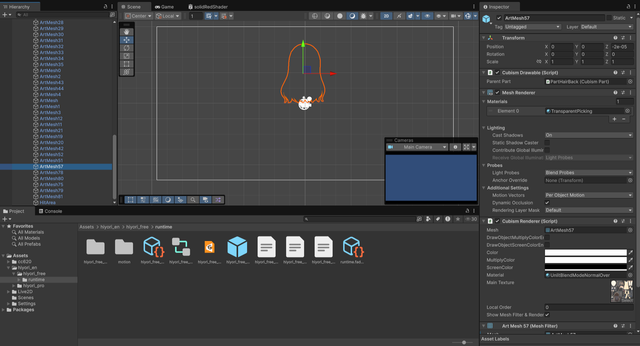
The model is invisible in both the Scene View and the Game View. We can see that the Mesh Renderer's material has changed to "TransParentPicking".
Investigation
I traced the issue into CubismRenderer.SetupPickingMaterial().
During initialization, the following line is executed:
_meshRenderer.sharedMaterial = CubismBuiltinMaterials.TransparentPicking;
After that, ApplyMainTexture() is called, but it only updates the MaterialPropertyBlock.
While investigating the SDK source, I found that:
_drawMaterialis assigned insideSetupPickingMaterial().- I could not find any references to
CubismRenderer.Materialin the SDK source. - I could not find where
MeshRenderer.sharedMaterialis restored to the original rendering material.
As a temporary experiment, I commented out the following line:
_meshRenderer.sharedMaterial = CubismBuiltinMaterials.TransparentPicking;
After doing so, the model renders correctly.
Additional information
- The mesh is generated correctly.
- The textures are loaded correctly.
- The Cubism Core native plugin is loaded correctly.
- The same issue occurs with multiple official sample models.
- I also replaced all C# source files with the latest GitHub version (keeping the official Core DLL). The issue still occurs.
- The issue reproduces on both Unity 6000.0.46f1 and Unity 6000.0.71f1.
Question
Is this the expected behavior?
If so, could you explain where the original rendering material is expected to be restored?
If not, could this be a compatibility issue with Unity 6000 and URP?
Thanks for your reading, and I apologize for any errors that may have occurred during the tracking process.
Comments
Thank you very much for using our product.
Have you set `CubismURPRenderer.asset` in the Renderer List of the Universal Renderer Pipeline asset?
If not, please set it and check to see if the model is displayed.
https://docs.live2d.com/en/cubism-sdk-tutorials/urp-import/#:~:text=Package import and settings
Best regards.