
Categories
- All Categories
- 1.4K Cubism Editor
- 1.2K Help
- 54 Tips and Tricks
- 200 Feature requests
- 51 Other Live2D Products and Tools
- 1 Cubism Viewer (for OW, for Unity)
- 3 Material Separation Photoshop Plug-in
- 47 Other Live2D Products and Tools (Other Photoshop Scripts, Sample Data, etc.)
- 302 Cubism SDK
- 266 Help
- 11 Tips and Tricks
- 25 Feature Requests
- 182 Community
- 40 General Discussions
- 10 Feature Requests
- 26 Projects, Showcase & Critiques
If you have any questions, reports, suggestions, or requests about Live2D, please send them to this forum.
※We cannot guarantee statements or answers from Live2D staff. Thank you for your understanding in advance.
Live2D Cubism
Cubism Products and Downloads
Cubism product manuals and tutorials
Cubism Editor Manual Cubism Editor Tutorial Cubism SDK Manual Cubism SDK Tutorial
※We cannot guarantee statements or answers from Live2D staff. Thank you for your understanding in advance.
Live2D Cubism
Cubism Products and Downloads
Cubism product manuals and tutorials
Cubism Editor Manual Cubism Editor Tutorial Cubism SDK Manual Cubism SDK Tutorial
[About Cubism Editor / SDK 5.4 Alpha](Updated: July 14, 2026)
You can download the alpha installer from the dedicated forum below.
If you have any feedback regarding the alpha version, including feature requests or bug reports, please use the same forum.
Cubism Editor / SDK 5.4 Alpha Forum
https://creatorsforum.live2d.com/c/cubismeditorsdk54alpha/
[Regarding macOS Tahoe](Updated October 16, 2025)
macOS v26 Tahoe is now supported!
We advise against upgrading your macOS at this time as it may cause Live2D products not to function correctly.
Upgrading macOS can also cause you to lose your Cubism Editor license file.
Please make sure to deactivate your Cubism Editor license before upgrading the macOS.
For more details:
https://help.live2d.com/en/other/other_09/
You can download the alpha installer from the dedicated forum below.
If you have any feedback regarding the alpha version, including feature requests or bug reports, please use the same forum.
Cubism Editor / SDK 5.4 Alpha Forum
https://creatorsforum.live2d.com/c/cubismeditorsdk54alpha/
[Regarding macOS Tahoe](Updated October 16, 2025)
macOS v26 Tahoe is now supported!
We advise against upgrading your macOS at this time as it may cause Live2D products not to function correctly.
Upgrading macOS can also cause you to lose your Cubism Editor license file.
Please make sure to deactivate your Cubism Editor license before upgrading the macOS.
For more details:
https://help.live2d.com/en/other/other_09/
For inquiries regarding issues with license purchases or license activation errors, please contact us through the email form.
[Feature Request] "Set Vertex Flow"–like tool for smoother mesh & "Loop Edge" selection tool

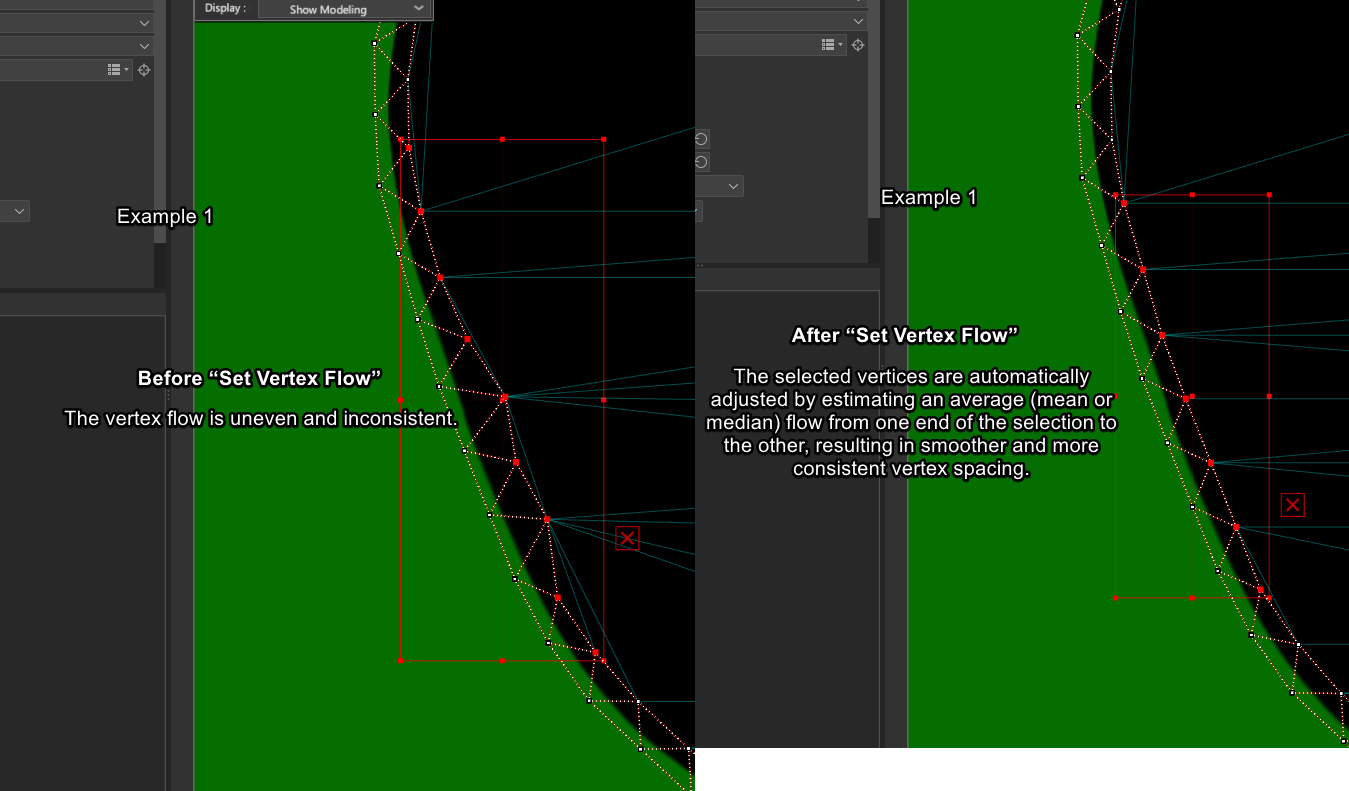
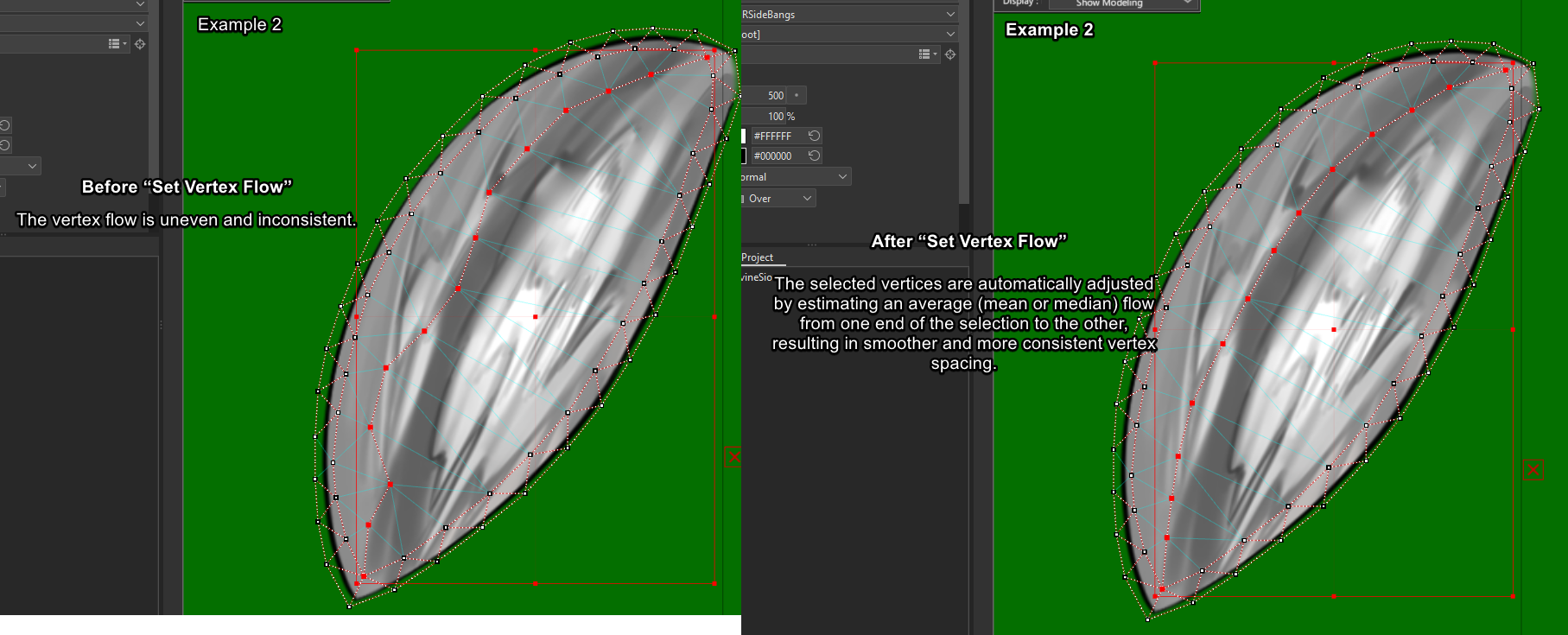
I’d like to request a feature similar to “Relax Vertex” or “Set Flow” in Blender3D, adapted for Live2D Cubism. I’m not sure whether this fits Cubism’s current design direction, so I’d like to hear your thoughts. It’s not an urgent feature, but I believe it could significantly speed up the workflow.
In Blender3D, these tools help even out vertex spacing and improve edge/flow consistency without drastically changing the overall shape. This is extremely useful for achieving clean and natural edge flow.
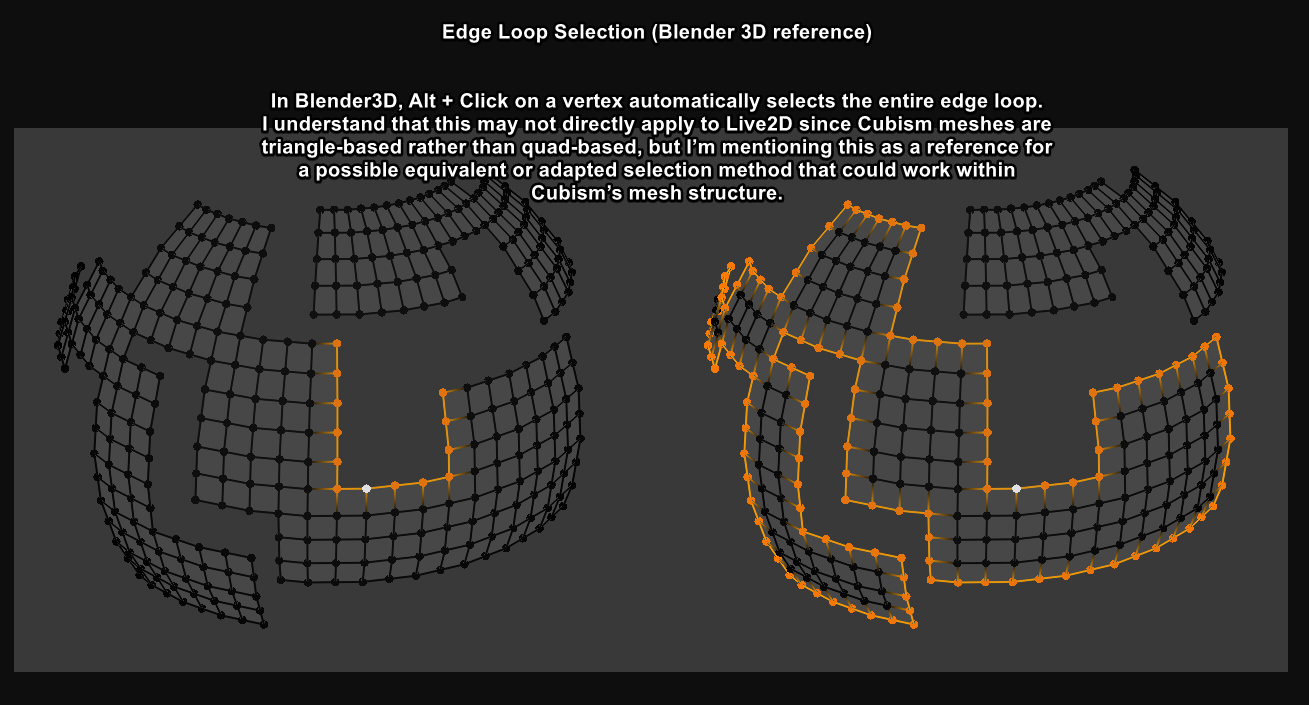
In Live2D, managing vertices one by one to achieve good flow can be time-consuming. Because of that, I feel this feature would work best if it were added together with a loop edge selection tool. Selecting vertices individually just to adjust vertex flow is inefficient.
Requests:
- Loop Edge selection tool
- “Set Vertex Flow” / vertex relax feature to automatically improve vertex spacing and flow
(optionally with a strength or iteration slider)
I’ve attached an image example for reference. Thank you for considering this request!
In Blender3D, these tools help even out vertex spacing and improve edge/flow consistency without drastically changing the overall shape. This is extremely useful for achieving clean and natural edge flow.
In Live2D, managing vertices one by one to achieve good flow can be time-consuming. Because of that, I feel this feature would work best if it were added together with a loop edge selection tool. Selecting vertices individually just to adjust vertex flow is inefficient.
Requests:
- Loop Edge selection tool
- “Set Vertex Flow” / vertex relax feature to automatically improve vertex spacing and flow
(optionally with a strength or iteration slider)
I’ve attached an image example for reference. Thank you for considering this request!
Tagged:
Comments
Thank you for using our product.
We have shared your request with our development team.
We appreciate your cooperation.