
Categories
- All Categories
- 1.4K Cubism Editor
- 1.2K Help
- 54 Tips and Tricks
- 200 Feature requests
- 51 Other Live2D Products and Tools
- 1 Cubism Viewer (for OW, for Unity)
- 3 Material Separation Photoshop Plug-in
- 47 Other Live2D Products and Tools (Other Photoshop Scripts, Sample Data, etc.)
- 302 Cubism SDK
- 266 Help
- 11 Tips and Tricks
- 25 Feature Requests
- 182 Community
- 40 General Discussions
- 10 Feature Requests
- 26 Projects, Showcase & Critiques
When I copy and paste a mesh it does not paste in the same spot

in Bug
Hello,
When I try to copy and paste mesh, it pastes above, instead of in the same spot.
The same thing happens when I try to edit both mesh's at the same time. While editing it looks right, but then once I am done and view them both, one is above the other.
- Live2D Software Version: Cubism editor 5.3.02 (Same thing happened on 5.3 so I updated to 5.3.02 in hopes it would fix it but it did not)
- OS & Version: windows 10
- Graphics Specifications: NVIDIA GeForce RTX 5060 Ti
- CPU: Processor AMD Ryzen 7 7700X 8-Core Processor, 4501 Mhz, 8 Core(s), 16 Logical Processor(s)
- Memory: 64gb
- Art software used: clip studio paint
-Here is a video of the issue: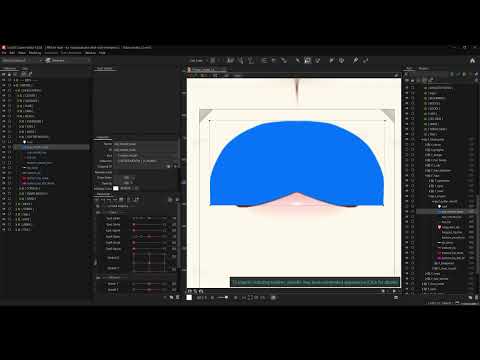 https://youtu.be/kuNVHqgEwHE
Am I doing something wrong? or is this a bug?
When I try to copy and paste mesh, it pastes above, instead of in the same spot.
The same thing happens when I try to edit both mesh's at the same time. While editing it looks right, but then once I am done and view them both, one is above the other.
- Live2D Software Version: Cubism editor 5.3.02 (Same thing happened on 5.3 so I updated to 5.3.02 in hopes it would fix it but it did not)
- OS & Version: windows 10
- Graphics Specifications: NVIDIA GeForce RTX 5060 Ti
- CPU: Processor AMD Ryzen 7 7700X 8-Core Processor, 4501 Mhz, 8 Core(s), 16 Logical Processor(s)
- Memory: 64gb
- Art software used: clip studio paint
-Here is a video of the issue:
https://youtu.be/kuNVHqgEwHE Am I doing something wrong? or is this a bug?
Comments
Thank you for using our product.
Please store the model file and log file experiencing the problem in the following data box.
https://biz.datadeliver.net/posts/9iN3V96YD5xh
Please note that this data box is only accessible to the development team.
For instructions on how to obtain logs, please see here:
https://help.live2d.com/en/other/other_22/
Thank you for your cooperation.