
Categories
- All Categories
- 1.4K Cubism Editor
- 1.2K Help
- 54 Tips and Tricks
- 186 Feature requests
- 50 Other Live2D Products and Tools
- Cubism Viewer (for OW, for Unity)
- 3 Material Separation Photoshop Plug-in
- 47 Other Live2D Products and Tools (Other Photoshop Scripts, Sample Data, etc.)
- 291 Cubism SDK
- 260 Help
- 11 Tips and Tricks
- 20 Feature Requests
- 179 Community
- 37 General Discussions
- 10 Feature Requests
- 26 Projects, Showcase & Critiques
If you have any questions, reports, suggestions, or requests about Live2D, please send them to this forum.
※We cannot guarantee statements or answers from Live2D staff. Thank you for your understanding in advance.
Live2D Cubism
Cubism Products and Downloads
Cubism product manuals and tutorials
Cubism Editor Manual Cubism Editor Tutorial Cubism SDK Manual Cubism SDK Tutorial
※We cannot guarantee statements or answers from Live2D staff. Thank you for your understanding in advance.
Live2D Cubism
Cubism Products and Downloads
Cubism product manuals and tutorials
Cubism Editor Manual Cubism Editor Tutorial Cubism SDK Manual Cubism SDK Tutorial
[Regarding macOS Tahoe](Updated October 16, 2025)
macOS v26 Tahoe is now supported!
We advise against upgrading your macOS at this time as it may cause Live2D products not to function correctly.
Upgrading macOS can also cause you to lose your Cubism Editor license file.
Please make sure to deactivate your Cubism Editor license before upgrading the macOS.
For more details:
https://help.live2d.com/en/other/other_09/
macOS v26 Tahoe is now supported!
We advise against upgrading your macOS at this time as it may cause Live2D products not to function correctly.
Upgrading macOS can also cause you to lose your Cubism Editor license file.
Please make sure to deactivate your Cubism Editor license before upgrading the macOS.
For more details:
https://help.live2d.com/en/other/other_09/
For inquiries regarding issues with license purchases or license activation errors, please contact us through the email form.
How Do I Optimize a Live2D Model?

- Live2D Software Version: Cubisim Editor 5.3
- OS & Version: Windows 11
- Graphics Specifications: GeForce 3060 12GB VRAM
- CPU: AMD Ryzen 5 5600X
- Memory: 32GB RAM
- Illustration Software used: Clip Studio
Related to my recent post, Katomon mentioned that it depended on the model. The PSD file is 127MB, but I had to add some corrections and masks so additional PSDs were imported into the project. I wasn't really aware of this until recently, so there are several imports that say "replacement completed" since I was saving it over the original PSD (I think?). That's probably why it's as laggy as it is now, especially with all the meshes set up. Can I fix this or am I doomed to stress test my PC every time I open this file
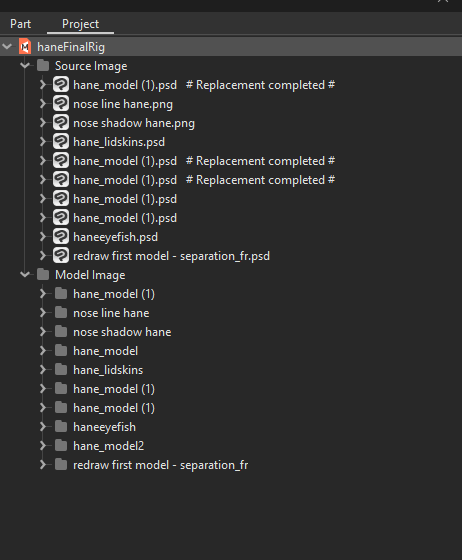
- OS & Version: Windows 11
- Graphics Specifications: GeForce 3060 12GB VRAM
- CPU: AMD Ryzen 5 5600X
- Memory: 32GB RAM
- Illustration Software used: Clip Studio
Related to my recent post, Katomon mentioned that it depended on the model. The PSD file is 127MB, but I had to add some corrections and masks so additional PSDs were imported into the project. I wasn't really aware of this until recently, so there are several imports that say "replacement completed" since I was saving it over the original PSD (I think?). That's probably why it's as laggy as it is now, especially with all the meshes set up. Can I fix this or am I doomed to stress test my PC every time I open this file
Tagged:
Comments
The only process to reduce the amount it is to reimport a single (or two) psd with all the corrected layers and manually replace all the others psd's inputs with these single or two new psd with all the info, it is a process really slow since you go layer per layer replacing the textures manually (open the source image or click the layer then click the psd, and right click and says replace selected artmesh or something around that), but it is why you need to do this in advance if possible.
Also it is really worth it, how much is left of this model, are you gonna keep going back at it constantly?
Now you know why riggers can deny/give a time limit for updates of the model, because after a while they get bad, if you are not planning ahead to be as optimize as possible