
Categories
- All Categories
- 1.4K Cubism Editor
- 1.2K Help
- 56 Tips and Tricks
- 187 Feature requests
- 51 Other Live2D Products and Tools
- Cubism Viewer (for OW, for Unity)
- 3 Material Separation Photoshop Plug-in
- 48 Other Live2D Products and Tools (Other Photoshop Scripts, Sample Data, etc.)
- 291 Cubism SDK
- 260 Help
- 11 Tips and Tricks
- 20 Feature Requests
- 183 Community
- 38 General Discussions
- 10 Feature Requests
- 26 Projects, Showcase & Critiques
If you have any questions, reports, suggestions, or requests about Live2D, please send them to this forum.
※We cannot guarantee statements or answers from Live2D staff. Thank you for your understanding in advance.
Live2D Cubism
Cubism Products and Downloads
Cubism product manuals and tutorials
Cubism Editor Manual Cubism Editor Tutorial Cubism SDK Manual Cubism SDK Tutorial
※We cannot guarantee statements or answers from Live2D staff. Thank you for your understanding in advance.
Live2D Cubism
Cubism Products and Downloads
Cubism product manuals and tutorials
Cubism Editor Manual Cubism Editor Tutorial Cubism SDK Manual Cubism SDK Tutorial
[Regarding macOS Tahoe](Updated October 16, 2025)
macOS v26 Tahoe is now supported!
We advise against upgrading your macOS at this time as it may cause Live2D products not to function correctly.
Upgrading macOS can also cause you to lose your Cubism Editor license file.
Please make sure to deactivate your Cubism Editor license before upgrading the macOS.
For more details:
https://help.live2d.com/en/other/other_09/
macOS v26 Tahoe is now supported!
We advise against upgrading your macOS at this time as it may cause Live2D products not to function correctly.
Upgrading macOS can also cause you to lose your Cubism Editor license file.
Please make sure to deactivate your Cubism Editor license before upgrading the macOS.
For more details:
https://help.live2d.com/en/other/other_09/
For inquiries regarding issues with license purchases or license activation errors, please contact us through the email form.
Cleaner Display of Parts Request

Hello!
With the new updates in mind for 5.3, I would like to request visual clarity changes for the parts menus
It's easy to get lost and lose track of model parts, and even using the color coding can get difficult if parts have multiple settings.
Because Multiply is different in 5.2 SDK and 5.3 SDK, finding all the multiply layers to change can also be difficult.
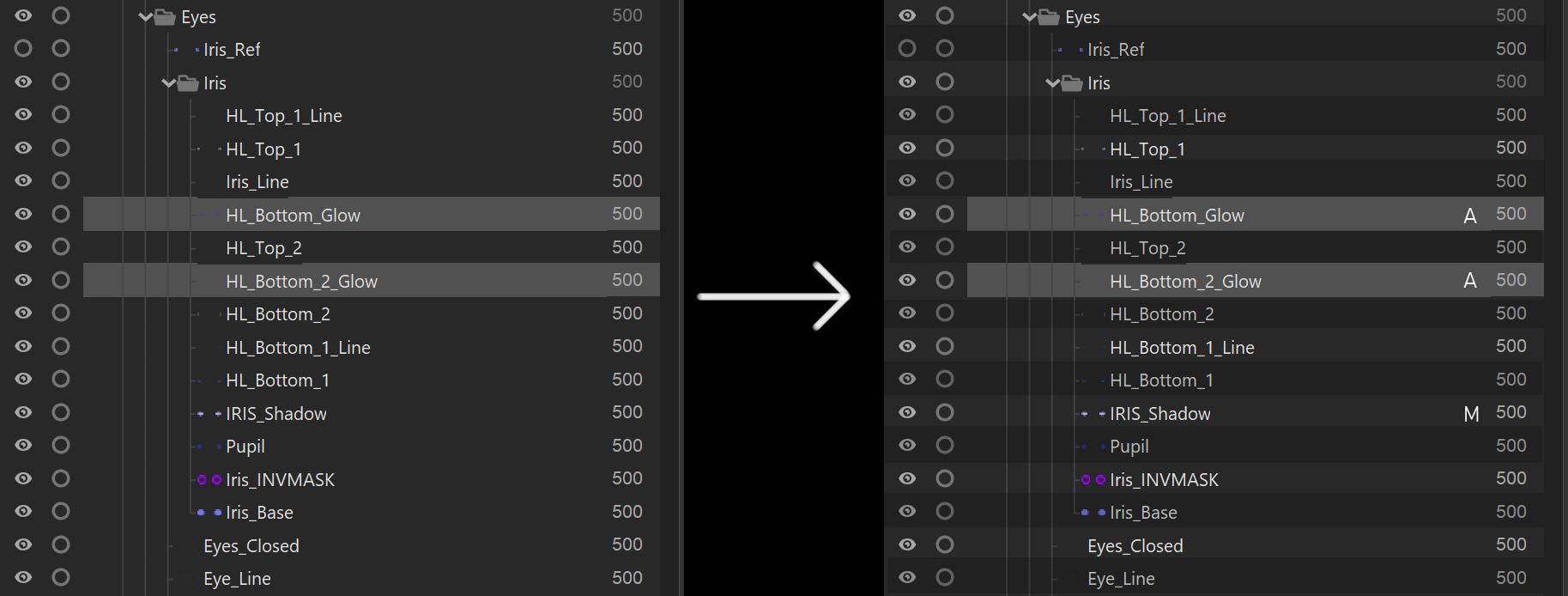
I would like to request an indicator on the layer/part to display it's layer style (only if it's special, normal layers should remain blank for visual clarity)
As well as a checker style line coloring, to allow the eye to better follow a layer to it's details such as draw order and layer style.
Thank you for making Live2D so amazing,
TAG
With the new updates in mind for 5.3, I would like to request visual clarity changes for the parts menus
It's easy to get lost and lose track of model parts, and even using the color coding can get difficult if parts have multiple settings.
Because Multiply is different in 5.2 SDK and 5.3 SDK, finding all the multiply layers to change can also be difficult.
I would like to request an indicator on the layer/part to display it's layer style (only if it's special, normal layers should remain blank for visual clarity)
As well as a checker style line coloring, to allow the eye to better follow a layer to it's details such as draw order and layer style.
Thank you for making Live2D so amazing,
TAG
Comments
Thank you for using our product.
We have shared your request with our development team.
We appreciate your cooperation.