
Categories
- All Categories
- 1.4K Cubism Editor
- 1.2K Help
- 54 Tips and Tricks
- 186 Feature requests
- 50 Other Live2D Products and Tools
- Cubism Viewer (for OW, for Unity)
- 3 Material Separation Photoshop Plug-in
- 47 Other Live2D Products and Tools (Other Photoshop Scripts, Sample Data, etc.)
- 291 Cubism SDK
- 260 Help
- 11 Tips and Tricks
- 20 Feature Requests
- 179 Community
- 37 General Discussions
- 10 Feature Requests
- 26 Projects, Showcase & Critiques
If you have any questions, reports, suggestions, or requests about Live2D, please send them to this forum.
※We cannot guarantee statements or answers from Live2D staff. Thank you for your understanding in advance.
Live2D Cubism
Cubism Products and Downloads
Cubism product manuals and tutorials
Cubism Editor Manual Cubism Editor Tutorial Cubism SDK Manual Cubism SDK Tutorial
※We cannot guarantee statements or answers from Live2D staff. Thank you for your understanding in advance.
Live2D Cubism
Cubism Products and Downloads
Cubism product manuals and tutorials
Cubism Editor Manual Cubism Editor Tutorial Cubism SDK Manual Cubism SDK Tutorial
[Regarding macOS Tahoe](Updated October 16, 2025)
macOS v26 Tahoe is now supported!
We advise against upgrading your macOS at this time as it may cause Live2D products not to function correctly.
Upgrading macOS can also cause you to lose your Cubism Editor license file.
Please make sure to deactivate your Cubism Editor license before upgrading the macOS.
For more details:
https://help.live2d.com/en/other/other_09/
macOS v26 Tahoe is now supported!
We advise against upgrading your macOS at this time as it may cause Live2D products not to function correctly.
Upgrading macOS can also cause you to lose your Cubism Editor license file.
Please make sure to deactivate your Cubism Editor license before upgrading the macOS.
For more details:
https://help.live2d.com/en/other/other_09/
For inquiries regarding issues with license purchases or license activation errors, please contact us through the email form.
(5.3 Beta) Option to toggle old artmesh paste behavior

The 5.3 beta seems to have implemented a "smart" artmesh pasting feature that attempts to automatically adjust where an artmesh is pasted. Unfortunately, the detection on that feature does not work properly, which leads to instances where an artmesh is misaligned when attempting to paste to the same location. I have linked a youtube video demonstrating this behavior:
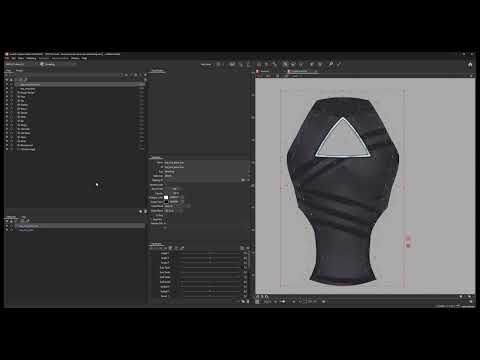 https://youtu.be/X8D3_L7brMo
Would it be possible to add a toggle between the old artmesh pasting behavior and the new behavior? The new behavior can be useful in many cases, but auto-adjusting the paste location isn't always necessary and can even be inconvenient.
https://youtu.be/X8D3_L7brMoWould it be possible to add a toggle between the old artmesh pasting behavior and the new behavior? The new behavior can be useful in many cases, but auto-adjusting the paste location isn't always necessary and can even be inconvenient.
Comments
Thank you for using our products.
We apologise for any inconvenience caused.
We plan to implement a fix for this issue shortly.
Please bear with us until the fix is complete.
Best regards.
This is the Live2D staff.
We apologize for the long wait.The issue reported in this topic has now been fixed.
Please update to the latest version, 5.3.00 beta2, and try it out.
We sincerely apologize for any inconvenience caused over the years.
Thank you very much for reporting this issue.
We would appreciate it if you could let us know if you notice any other issues.
Update 2025/9/18: We apologize. The issue has not yet been fixed. We apologize for providing incorrect information.
Here you can see if i open both artmeshes together to edit them they show on the proper source position.
But if i copy paste one from the other it pastes on another place
Sorry for bothering you again with the same bug ;w;
PD: the work around is still the same too, deform back the one you are pasting from and then do the copy/paste of the artmesh to "sync" it again
Thank you for reporting this.
Please check the following three points.
①
This may be a similar issue, but just to be sure, please provide detailed instructions on the steps you took to reach the state shown in the attached video.
②
Is this issue occurring with model data newly created with Cusbim Editor 5.3.00 beta4?
③
Store your model data in the following data box.
https://biz.datadeliver.net/posts/wQFIkD7KMRsa
You can also delete other ArtMesh files and save only the affected part.
This data box will only be made available to the development team.
Thank you for your cooperation.
I remember this not happening on the beta3 or beta 2 but was happening on beta 1, sadly i dont have the previus installation but i can show what was happening on 5.2
I know there was a new feature you added to be able to copy paste different shaped stuff into the artmesh and i appreciate that but could you leave the original copy pasting method depending on the "display" view ?
So on "Display: model image" uses the source image as reference and for the "Display: Modelling" uses the edited artmesh, Thank you in advance!!!
Thank you for the explanation.
We will look into this within the development team, so please wait a moment.
Thank you in advance.
We would like to inform you of our future plans.
We have conducted further research based on the feedback we have received so far.
We have found that the issue may not work correctly in some use cases, so we will revert to the behavior of the 5.2 Editor in the next version.
We will continue our research and, taking your feedback into consideration, make adjustments to improve user convenience.
Thank you for your understanding.